Setup
Three parts,
no accounts
Run a relay
One container, or one JAR. It keeps each channel's members apart and hands out the talk floor. No database, nothing to back up. There is a walkthrough from a spare machine to two handsets talking, firewall and all.
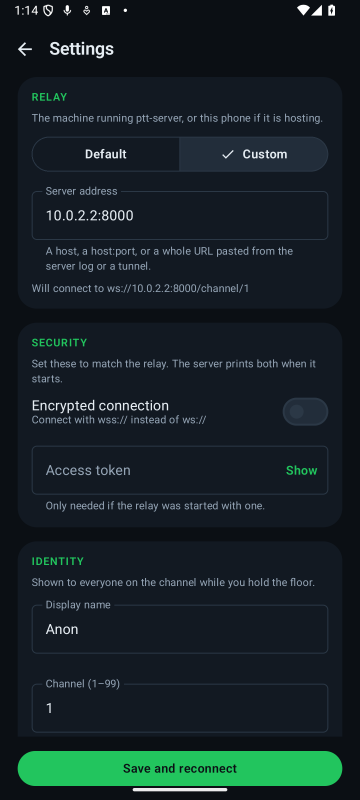
Point the phones at it
Paste the address the server printed, or a tunnel URL, into one box —
the scheme sets the port and the encryption for you. The app shows the exact
ws:// URL it will dial, so a typo is visible before you start wondering
why nothing works.
Pick a channel and press
Channels 1–99. Pressing asks the server for the floor; the microphone opens only once the server answers that it is yours.
Nothing leaves your network. Putting it on the internet means a reverse proxy you own, not a service somebody else runs.
Platforms
One codebase,
three platforms
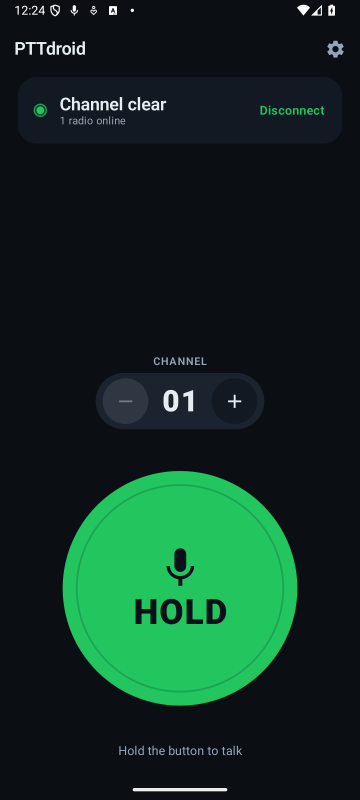
Android, desktop and iOS are the same Kotlin, compiled three ways. Compose Multiplatform draws the screen above on all three from one set of composables — so the button, the colours and the wording cannot drift apart between platforms, because there is only one of each to change.
A :shared module holds everything that is not tied to a device: the
socket, the talk-floor logic, the settings store and the shared UI primitives.
:core carries the MVI base and the shared widgets. The interface itself is
split by feature — three small :features:* modules behind
:features-api:* contracts, each owning its screen and its reducers, composed
by a :ui-shell root host. What is left outside all of it is small — the
Android launcher is fourteen Kotlin files, and the desktop app is one
Window {}.
Below that, one intermediate source set belongs to Android and desktop together: the
OkHttp transport, the pinned trust manager and the on-device relay all need JVM APIs that
iOS does not have. iOS brings its own three instead — Ktor's Darwin engine, a
hand-rolled certificate pin check, and AVAudioEngine.
:shared
├─ commonMain      android · desktop · ios
├─ jvmCommonMain   android · desktop
├─ androidMain
├─ desktopMain
└─ iosMain
:core             MVI base + shared widgets
:features-api/*   screen contracts
:features/*       screen implementations
:ui-shell         App() host, iOS framework

:app          Android launcher, service,
              widget, overlay bubble
:desktopApp   one Window {}
iosApp/       Xcode, ComposeUIViewController
390 unit tests on the Android target; 378 of them run twice, compiled once for Android and once for desktop — every module but the Android-only :app. iOS Kotlin is compiled on every push — which a Linux machine can do — then linked into a real framework and built through Xcode on a macOS runner, which is the only place that part can happen.
| Android | Desktop | iOS | |
|---|---|---|---|
| Talk floor, channels, reconnect, settings | Yes | Yes | Yes |
| UI language (English, Russian, Serbian) | Yes | Yes | Best-effort, next launch only |
| Microphone and speaker | AudioRecord |
javax.sound |
AVAudioEngine |
| Speaker or earpiece | Yes | — one output, chosen in the OS | Yes |
| Playback volume | Yes | Yes | Yes |
Pinned wss:// |
Yes | Yes | Yes, minus the certificate's validity window |
| Host a relay on this device | Yes | Yes | — |
| Keeps talking with the app out of the way | Yes, a foreground service, indefinitely | While its window is open | Audio survives backgrounding |
| Floating button, widget, notification, volume-key and headset PTT | Yes | — | — |
| Packaged by CI | Signed APK on the GitHub release | .deb .msi .exe .dmg |
Xcode archive, by hand |
The dashes are platform limits rather than a backlog: neither desktop nor iOS gives a third-party app an always-on-top window over everything else, iOS cannot open the microphone from a background notification handler, the on-device relay is a JVM server, and a desktop has one output device, chosen in the operating system rather than in an app. Row by row, with the reasoning: platform-support.md.
Interface
Built for not
looking at it
A walkie-talkie is used one-handed, in motion, while you are looking at something else — the road, the load, the other person. Three questions have to be answerable in one glance: can I talk, is anyone hearing me, which channel. Everything you touch sits in the bottom half of the screen, where a thumb actually lands.
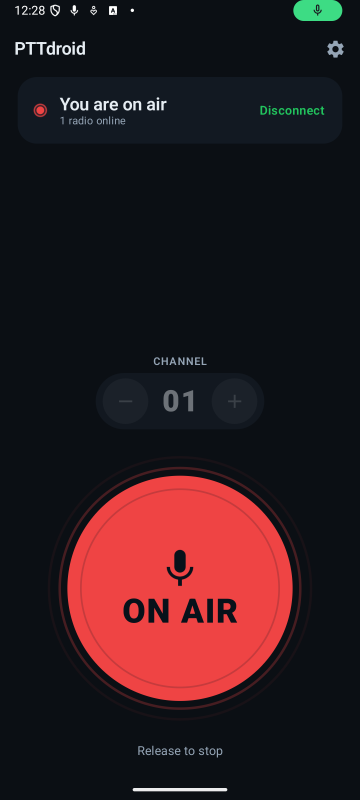
Colour follows radio convention rather than traffic lights. Red is on air, not "stop". An incoming transmission is blue rather than green, because green here means the channel is yours — which is the opposite of somebody else holding the floor.
And nothing depends on colour alone: every state also changes the word on the button and the glyph above it.
Above the channel stepper: loudspeaker or earpiece, and a volume slider. A walkie-talkie is a loudspeaker, so that is the default. Both sit on the main screen rather than behind the gear icon, because both are things you change while somebody is still talking. The pill has no colour of its own — the live route is named in words and the selected key is inverted — because on this screen colour belongs to the state of the channel.
| State | Button | Meaning |
|---|---|---|
| Ready | HOLD | Connected, floor free — the only state where a press transmits |
| Requesting | WAIT | Asked for the floor, no answer yet. Speaking now clips your first word |
| Transmitting | ON AIR | The server granted the floor; the microphone is open |
| Receiving | BUSY | Someone else is talking, and they are named on screen |
| Offline | OFFLINE | No transport — and the card shows the address it cannot reach |
Hands-free · Android
Talk without
opening the app
On Android, a microphone foreground service keeps the channel connected, so the app does not have to be in front — or even open — to hear or be heard.
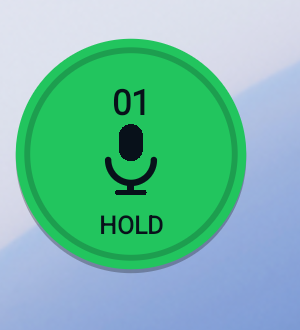
- Floating button — hold to talk over any other app, drag to move. It carries the channel number and a microphone, struck through whenever a press would do nothing.
- Home-screen widget — tap to toggle transmit, −/+ for the channel.
- Volume keys and headset button — an opt-in setting: hold a volume key (app open) or the headset button to talk.
- Notification — Talk, Stop and Disconnect, with the live status.
The widget is a toggle rather than a hold, because a widget only ever receives discrete clicks — there is no touch-down and touch-up to hold on to.
All three surfaces are Android's, and are the one part of the app that is not shared. Neither desktop nor iOS has a cross-app window or a home screen to put them on; the desktop build talks for as long as its window is open, and the iOS build for as long as its audio session survives being backgrounded.
Get it
Download
the APK
Every tagged release carries a signed APK, attached to its release page on GitHub:
github.com/devapro/ptt-client-android/releases
A submission to the official F-Droid catalogue is in review; once it lands, F-Droid will be the better route on a phone, because it updates by itself. This project runs no F-Droid repository of its own — an app installed from f-droid.org and one sideloaded from here are signed by different keys, and Android will not upgrade one into the other.
Desktop. The same tag
builds installers — .deb, .msi, .exe and
.dmg, one per runner, since jpackage cannot cross-compile — attached to that
same GitHub release. They are unsigned and un-notarised, so macOS and Windows will each want
convincing before they run one.
iOS. Not distributed anywhere: open
iosApp/iosApp.xcodeproj and run it on your own device.
You still need a relay. That is the next section.
Build it
Two commands
Start the relay
# in ptt-server/
docker compose up -d
curl -s localhost:8000/health
Or ./gradlew run with JDK 21, if you would rather
not use Docker.
Build and install the app
# in ptt-client-android/
./gradlew assembleDebug
adb install -r -g \
  app/build/outputs/apk/debug/PTTdroid-*-debug.apk
Then set the relay host in Settings. On an emulator that is
10.0.2.2 — inside an emulator, localhost is the emulator itself.
Not a phone? ./gradlew
:desktopApp:run opens the same interface in a window, and
:desktopApp:packageDeb (or packageMsi, packageDmg on
their own OS) makes something installable. For iOS, open iosApp/iosApp.xcodeproj
in Xcode — Gradle builds :ui-shell into a framework as part of that build.
127.0.0.1, and point the other
phones at its address on the Wi-Fi.
Settings
Nothing is
compiled in
The relay address, display name, channel, theme and language are all settings. An earlier build had a LAN address baked into the socket class, which made it useless on any other network — so the relay address being editable, and visible, is rather the point.
- Relay — Default, or one Custom address box that takes a host,
a
host:portor a whole pasted URL. Live preview either way. - Identity — the name others see while you hold the floor.
- Appearance — follow the system, or force light or dark.
- Language — follow the system, or force English, Russian or Serbian. A channel gets handed to people who don't read whatever language its owner's phone is set to.
- Hands-free — the floating button, and the on-device relay.
Any screen
Phones and tablets,
light and dark
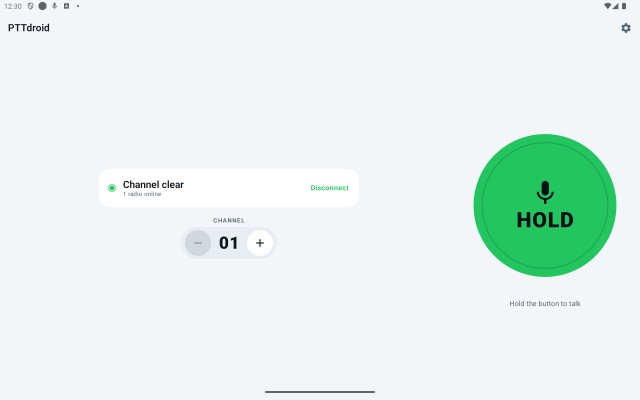
In landscape the readout moves beside the button instead of above it, so the control never gets squeezed into whatever is left over.
Source
Two repositories,
one wire contract
ptt-client-android
Kotlin, MVI, Compose Multiplatform. A handful of modules
— :shared, the feature screens and their contracts, the
:ui-shell host, the Android :app, :desktopApp and an
Xcode project — plus Koin and the Ktor client. One controller owns the connection, the
microphone and the speaker; on Android it is hosted by a foreground service, and the screen,
the floating bubble and the Glance widget are all observers of a single state flow.
390 unit tests on the Android target (378 on desktop) · 47 Compose UI tests · iOS compiled on every push
ptt-server
Kotlin and Ktor. Per-channel isolation and server-enforced floor control. Every session has its own bounded outbound queue drained by its own writer coroutine, so one slow peer cannot stall the channel.
45 tests, driven through real WebSocket clients
The wire protocol is specified once, in the server repo, and the client follows it: protocol.md. The reasoning behind the interface is written down in ui-design.md.