n-dashboard Kinds Authoring Reliability The board Get started

Self-hosted · single page · your LAN

A dashboard where every widget is a function.

No query builder, no plugin format, no YAML dialect to learn. A widget is a TypeScript file on disk that returns data. The platform runs it on a schedule, on an MQTT message or on a webhook, checks what came back against a typed schema, and pushes it to every open tab.

import type { Ctx, StatData } from '@n-dashboard/widget'

export default async function (ctx: Ctx): Promise<StatData> {
  const r = await ctx.fetch(URL).then((r) => r.json())

  return {
    value: r.bitcoin.usd,
    unit: 'USD',
    delta: r.bitcoin.usd_24h_change,
  }
}
BTC / USD just now
64,767USD
▲ 1.48%Bitcoin
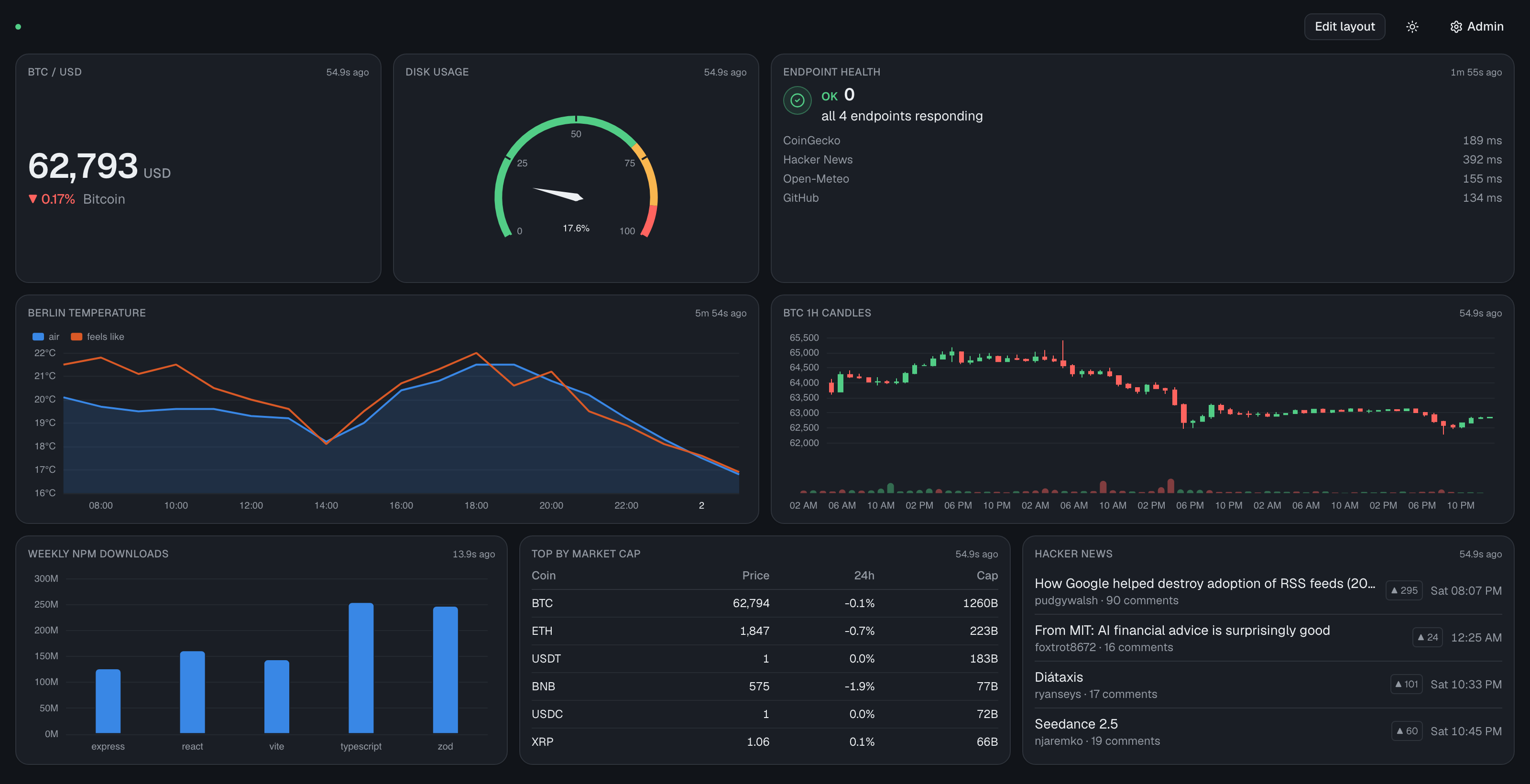
The n-dashboard board: a Bitcoin price stat, a disk-usage gauge, an endpoint-health alert listing four
                 APIs and their response times, a two-series Berlin temperature chart, Bitcoin candlesticks with volume,
                 a weekly npm downloads bar chart, a market-cap table and a Hacker News list.
Eight widgets, eight live sources, one file each.
9widget kinds, each with a published type
3trigger types: clock, MQTT, webhook
213tests over storage, runner, auth and sources
0build step for the server — Node runs the TypeScript

One contract

The function is called. It returns data. That never changes.

Everything else — how often it runs, whether a message woke it up, where its API key came from, what happened last time — is the platform's problem. There is exactly one kind of widget in the system, so summing a field, mixing two APIs and remembering what you already saw are all the same amount of work.

Runs server-side

Keys never reach the browser

Widgets execute in the server's worker pool, so there is no CORS to fight, no secret in a bundle, and one poll feeds every open tab. MQTT sockets and OAuth tokens live where a long-lived connection belongs.

Checked, not hoped

A wrong shape is an error, not a blank box

Each kind publishes a TypeScript type and a matching schema. The result is validated on the main thread after the widget returns — so a stringified number from an API surfaces as delta — expected number, received string rather than an empty card.

Plain files

Editable without the app

Each widget is a folder holding its code, its config and its recorded history. Diff it, grep it, edit it in your own editor, copy one between machines. The admin panel is a convenience, not the gatekeeper.

Nine kinds

Pick what it looks like; write what it means.

The kind decides the renderer and the return type. Note how much stat covers on its own — a crypto price, a stock quote, an MQTT temperature and a sum over an API response are the same card. The difference lives in the function, not the widget catalogue.

statStatData Big number with a unit, a percentage delta and a sparkline.
line-chartLineChartData One or more time series. Live, recorded, or both at once.
candlestickCandlestickData OHLC candles, with volume in its own pane below.
gaugeGaugeData A bounded value with threshold bands — disk, CPU, humidity.
listListData Title, subtitle, time and badge. Calendars and feeds.
alertAlertData A state — ok, warn or critical — with a message and a count.
tableTableData Rows and columns, straight from a response.
bar-chartBarChartData Categorical comparison across one or more series.
markdownMarkdownData Static rich text — notes, links, a header for a group.

Triggers

When it runs is configuration. What it does is code.

Declare one trigger or several. The invocation contract is identical either way, so a widget can poll on a clock and still repaint the instant something pushes to it.

"triggers": [{ "every": "30s" }]

On a clock. Start times are jittered, so twenty widgets on 30s don't all fire on the same tick and queue behind each other.

"triggers": [{ "mqtt": "home/+/temperature" }]

The instant a message lands. The server subscribes to exactly the union of filters declared by enabled widgets — no wildcard firehose — and recomputes it whenever you enable or edit one.

"triggers": [{ "webhook": true }]

On a POST to a URL carrying a per-widget random token, with the payload on ctx.trigger.body. Anything that can call a URL can drive a card.

Authoring

Real type checking, in the browser, against the real API.

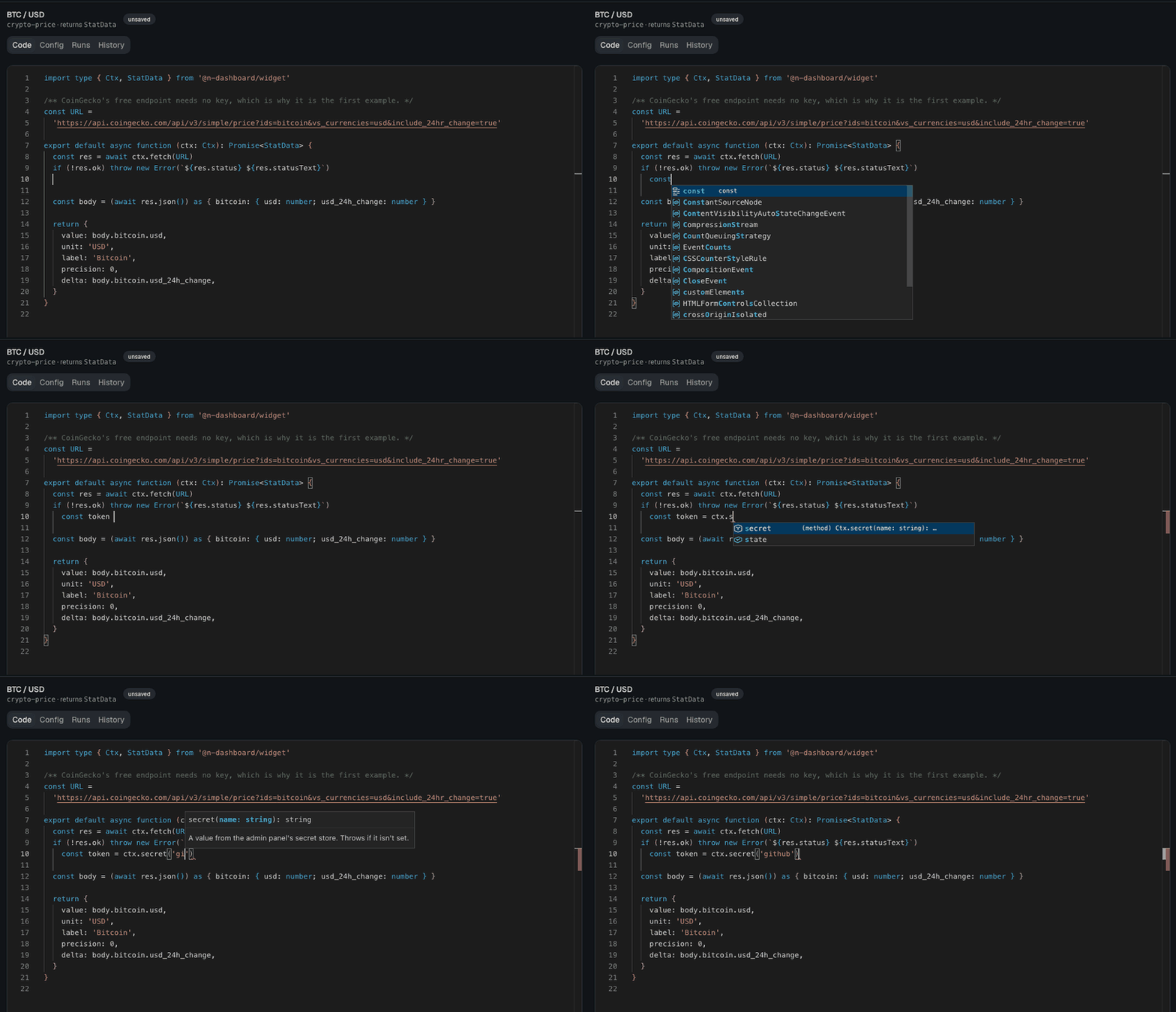
The editor runs the actual TypeScript language service, fed the same declaration file the server validates against. One source of truth, so the types you get in the editor cannot drift from the ones that run. Autocomplete on ctx. is the reason TypeScript widgets are worth having.

Typing ctx. in the widget editor opens the completion list — fetch, google, graphql, history, id, log,
                 mqtt, secret, state, test, trigger — then typing sec narrows it to secret and accepting it shows the
                 signature secret(name: string): string with its doc comment.
Not a snippet library — the TypeScript language service, reading the same ctx.d.ts the server validates against.

Run, before you commit to it

Real connections, real secrets, throwaway state

Press Run and the widget executes against the live API with your real credentials — but state writes go to a scratch copy and nothing is appended to history. It is safe to mash: no polluted series, no advanced "mark as seen" cursor.

✓ ran in 155ms

✓ schema: matches

console:

[log] fetched 72 klines

returned:

{ "value": 64767, "unit": "USD", "delta": 1.48 }

Start from a response

Click the field you want

The creation wizard fetches a sample through the server, shows it as a tree, and lets you click your way to a value — including sum, count and average over an array. Then it writes real TypeScript and hands you the editor. It is a code generator, not a second widget model, so it is offered at create time only.

A source it has never heard of is still a source: write the function yourself, the server runs it with real connections, and the picker works over whatever it returned. Or skip the wizard and start from the kind's starter function.

{ "ethereum": { "usd": 1920.21 ← click } }

↓ generates

return { value: r.ethereum.usd }

Memory

Two problems, two mechanisms.

Remembering a cursor between runs and charting a value over a day are not the same job, so they are not the same feature.

ctx.state

A small blob that survives restarts

How an alert widget remembers lastSeenMessageId and reports only what is new. Read when the widget is invoked, written back when it finishes — which is what lets the getter stay synchronous despite running on another thread.

const lastSeen = ctx.state.get<string>('lastSeenTs') ?? '0'
const fresh = messages.filter((m) => m.ts > lastSeen)
ctx.state.set('lastSeenTs', messages[0].ts)

History

Opt in, and instants become a series

Add "history": { "retain": "24h" } and the platform appends one number per successful run to a bounded on-disk series. That is what makes an MQTT temperature — which arrives as a single reading — chartable over a day, with no accumulation code in the widget. Any widget can read any widget's history.

const points = await ctx.history.query({
  widget: 'office-temp', since: '24h',
  bucket: '5m', agg: 'avg',
})
return { series: [{ name: 'Office °C', points }] }

Connections

Configured once, owned by the platform.

It holds the socket, refreshes the token and handles reconnect backoff, so widget code stays short. You never see a client object.

MQTT

Subscriptions are derived from what your widgets declare, not configured separately. The latest value per topic is cached and mirrored to disk, so after a restart ctx.mqtt().latest() returns the last known reading — flagged stale — instead of nothing. A chatty sensor is coalesced down to one queued run carrying the newest message.

Google Calendar, both ways

A secret iCal address works in five minutes with no cloud project; OAuth gives live data and costs a one-time setup. Both sit behind the same calendar.upcoming(), so switching between them is a setting rather than a rewrite.

Secrets stay put

Stored chmod 600 outside your config, write-only from the panel. No route reads a value back — the API reports only whether a slot is filled — and nothing appears in a response, a log line or an event frame.

When things break

Silent staleness is the worst dashboard failure.

A price you can still roughly trust beats an empty rectangle — as long as the card admits how old it is. So a failing widget keeps its last good value, dimmed, with a badge, its age, and the reason on hover.

  • One widget cannot take the others down. Widgets run in a worker pool with a hard timeout, and terminating a worker kills an infinite loop and an await that never settles — which a sandboxed timeout cannot do.
  • Repeated failures back off. Exponentially, from the widget's own interval up to a cap, and reset on the first success. A dead endpoint gets four attempts in the time it would have had nine.
  • The clock backs off; you don't. A message arriving, a webhook firing or a person pressing refresh always runs immediately.
  • Every run is inspectable. A Runs tab keeps the last fifty: status, duration, what triggered it, console output and the error.
BTC / USD ⚠ 2m ago
64,727USD
▲ 1.70%Bitcoin

One board

Every open tab agrees about it.

Where the cards sit, whether the board is being rearranged, and whether it is light or dark are all fields in one file on the server — pushed over the same stream the values ride. Move a card on your laptop and the wall display follows. Switch it to dark and you don't walk over to the wall to do it again.

data/dashboard.json

{
  "layout": [ /* one entry per card */ ],
  "editing": false,   // not per tab
  "theme": "dark"      // not per browser
}
  • No tab left silently draggable. Edit mode is one flag for the install, so leaving it on a laptop leaves it on everywhere.
  • The palette is the board's, not the browser's. A wall display that reboots at 3am comes back in the theme you chose, without a local setting to lose.

Optional login

The panel can be locked; the board stays a board

Set ADMIN_PASSWORD in .env and /admin asks for it — as does every route behind it: widget source, run logs, history, connections and the secret store. Leave it unset and everything stays open, which is the right answer on a trusted LAN and the way it always worked.

Signed out, the board still draws itself and webhooks still fire on their own tokens — but nothing can be written to it, and the header shows a liveness dot and nothing else. No edit button, no theme switch, no link to the panel for whoever walks past the screen.

One shared password from the environment, an httpOnly session cookie, and sessions that end when the process does. It keeps the panel out of reach of the room, and it is not pretending to be more.
On disk

One folder per widget. One directory to back up.

Config writes are atomic — temp file then rename — and keep the previous contents beside them, so a hand-edit that breaks the JSON is recoverable. A corrupt history file costs you one series, not your dashboard.

data/
├── dashboard.json          layout, edit mode, theme
├── connections.json        brokers, calendars — no secret values
├── .secrets.json           chmod 600, gitignored
└── widgets/
    └── office-temp/
        ├── widget.json     kind, triggers, retention, hook token
        ├── widget.ts        the function
        ├── state.json       ctx.state
        └── history.ndjson   append-only, trimmed to the window

Palette

Charts and cards share one token set

The eight series colours are read back out of the same CSS variables that style the cards, so the two cannot drift. The order is the colour-blind safety mechanism, not decoration: it is validated for separation against the card surface in both light and dark.

chart-1
chart-2
chart-3
chart-4
chart-5
chart-6
chart-7
chart-8

Get started

Clone, install, open.

Needs Node 26 or newer — the server runs its TypeScript directly, with no build step and no transpiler, which is also what gives widget stack traces honest line numbers.

git clone https://github.com/devapro/n-dashboard
cd n-dashboard
npm install
npm run dev            # http://localhost:5273

The first run copies seventeen example widgets in, disabled — so nothing is broken for want of an API key. Enable the ones you want; eight of them — the price, weather, Hacker News, npm, endpoint-health, candlestick, issue-sum and disk cards — need no key at all. Set ADMIN_PASSWORD in .env to put a login on /admin; the board itself stays open by design, so bind it to your LAN and keep it off the public internet.

Always on

Or pull the container

docker run -d -p 8080:8080 \
  -v n-dashboard-data:/app/data \
  ghcr.io/devapro/n-dashboard:latest

Prebuilt for amd64 and arm64, so a Pi or an ARM NAS needs no local build. :latest follows releases and :edge follows main. Prefer to build it yourself? cd docker && docker compose up -d --build, and --profile broker brings up an MQTT broker too.

data/ is the single mutable volume — widgets, layout, secrets and history. Back that up and you have backed up everything.

Deliberately absent

What it doesn't do.

A personal dashboard for one person on one network can be much simpler than a product, and these were left out on purpose rather than pending.